
SDR CTF: Radio Data System
Requirements:Basic receiver software and a single dongle.
Capabilities:Easily determine what commercial FM broadcast you are receiving, connect basic receiver software to an auxiliary program, add a plugin to SDRSharp.
Radio Data System (RDS) is present is some FM commercial broadcasts. It's what displays the station identification or sound name on your modern car radio. There can be more to it than that though.
Capturing the signal for display is very easy, current versions of SDRSharp will render the text on the waveform display for you. What's the fun in that? There might be more to the signal that just the station and song identification. Let's dig a little deeper.
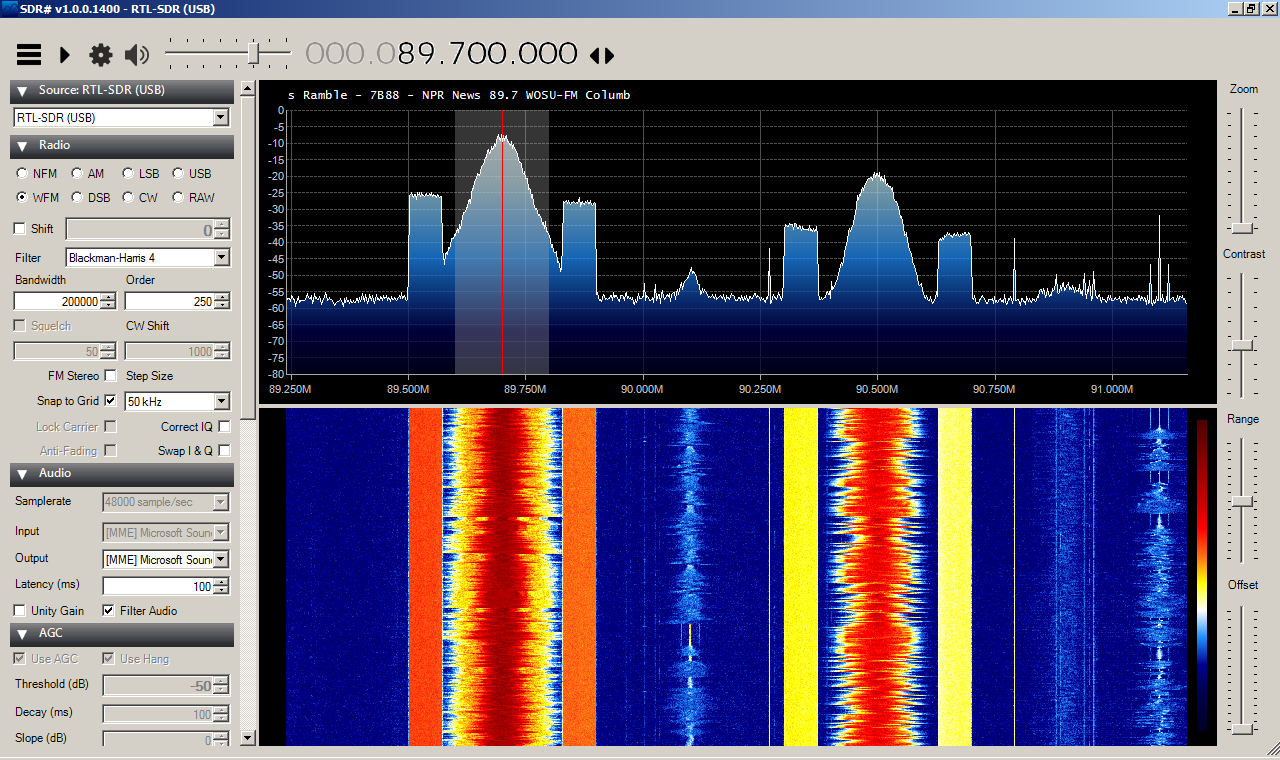
RDS Spy and SDRSharp with MPX Output Plugin
First we'll download and install RDS Spy from rdsspy.com.
Next we're going to add a plugin called MPX Output.
- go to http://rtl-sdr.ru/page/vse-dostupnye-na-etom-sajte-plaginy-s-kratkim-opi...
- scroll down to MPX Output and download mpxoutput.zip
- extract SDRSHapr.OutMPX.dll and save it into your sdrsharp directory
- copy the contents from magicline.txt to your clipboard
- edit Plugins.xml pasting the configuration line above the <sharpPlugins>
NOTE: the above process works on older versions of SDRSharp, i.e. before airspy took over. Now I'm trying to use The Pluginator which is part of the Frequency Manager Suite
On Linux from the Command Line
Sure a GUI makes it all look pretty, but sometimes you just want the data, free of bells and whistles. Windytan aka Oona Räisänen wrote up a bit of code that uses the rtl_fm command line tool to pull out the RDS signal associated with a commercial broadcast frequency. Take a look at her blog on redsea especially her beautiful signal images on how the code works. You can download redesa via this github link.
$git clone https://github.com/windytan/redsea.git
$cd redsea
$make
$perl redsea.pl -h
Usage: redsea.pl [-hlst] [-p
-h display this help and exit
-l print groups in long format
-s print groups in short format (default)
-t print an ISO timestamp before each group
-p
allows for faster PLL lock if set correctly)
FREQ station frequency in Hz, can be SI suffixed
(94.0M)
Then we can execute with something like:
Waiting for sync at 89.70 MHz
Found 1 device(s):
0: Realtek, RTL2838UHIDIR, SN: 00000001
Using device 0: Generic RTL2832U OEM
Found Rafael Micro R820T tuner
Tuner gain set to automatic.
Tuned to 90200000 Hz.
Oversampling input by: 8x.
Oversampling output by: 1x.
Buffer size: 4.10ms
Exact sample rate is: 2000000.052982 Hz
Sampling at 2000000 S/s.
Output at 250000 Hz.
2015-11-18T02:53:20+0100 7B88?
2015-11-18T02:53:20+0100 7B88 0A TP:0 PTY:00 DI:StaPTY TA:0 MS:S AF:(filler) AF:(filler) PS:'Ne '
2015-11-18T02:53:20+0100 7B88 0A TP:0 PTY:00 TA:0 MS:S AF:(filler) AF:(filler) PS:'News '
2015-11-18T02:53:20+0100 7B88 2A TP:0 PTY:00 RT_RESET RT:' SU-F '
2015-11-18T02:53:20+0100 7B88 0A TP:0 PTY:00 DI:StaPTY TA:0 MS:S AF:(filler) AF:(filler) PS:'Siws '
2015-11-18T02:53:20+0100 7B88 0A TP:0 PTY:00 TA:0 MS:S AF:(filler) AF:(filler) PS:'Side '
2015-11-18T02:53:20+0100 7B88 2A TP:0 PTY:00 RT:' SU-FM Co '
2015-11-18T02:53:20+0100 7B88 0A TP:0 PTY:00 TA:0 MS:S AF:(filler) AF:(filler) PS:'Sides '
2015-11-18T02:53:21+0100 7B88 0A TP:0 PTY:00 DI:Stereo TA:0 MS:S AF:(filler) AF:(filler) PS:'Sides ' PS_OK
2015-11-18T02:53:21+0100 7B88 0A TP:0 PTY:00 DI:StaPTY TA:0 MS:S AF:(filler) AF:(filler) PS:'Sides '
2015-11-18T02:53:21+0100 7B88 2A TP:0 PTY:00 RT:' SU-FM Columb '
2015-11-18T02:53:21+0100 7B88 0A TP:0 PTY:00 TA:0 MS:S AF:(filler) AF:(filler) PS:'Sides '
2015-11-18T02:53:21+0100 7B88 0A TP:0 PTY:00 TA:0 MS:S AF:(filler) AF:(filler) PS:'Sides '
2015-11-18T02:53:21+0100 7B88 2A TP:0 PTY:00 RT:' SU-FM Columbus↵ '
2015-11-18T02:53:21+0100 7B88 0A TP:0 PTY:00 DI:Stereo TA:0 MS:S AF:(filler) AF:(filler) PS:'Sides ' PS_OK
2015-11-18T02:53:21+0100 7B88 2A TP:0 PTY:00 RT:'NPR SU-FM Columbus↵
For a quick explanation of what this all means:
- the 7B88 is the PI code which identifies the station.
- The 0A and 2A are the group type (each line is a group)
- TP:0 is a flag to indicate if this is a traffic program
- PTY:00 is the program type, no program type in this case
- TA:0 is a flag to indicate if a traffic announcement is currently being made
- MS indicates if it is currently music or speech
- AF would indicate alternative frequencies should this signal become too weak (as in a moving car)
- PS is 8 characters of the program service name
See, there is a lot more hiding in those transmissions. If you monitor more stations, you'll see more codes and even some encrypted data intended for car navigation systems.
- Log in to post comments